
 1/12
Momentary Microphone Mute/Talk Button
MFR #MUTEMATE-85
Availability: In-Stock
Key Features
- Press-to-mute or press-to-talk
- Compatible with dynamic and condenser mics
- 85 dB of mic attenuation
Overview
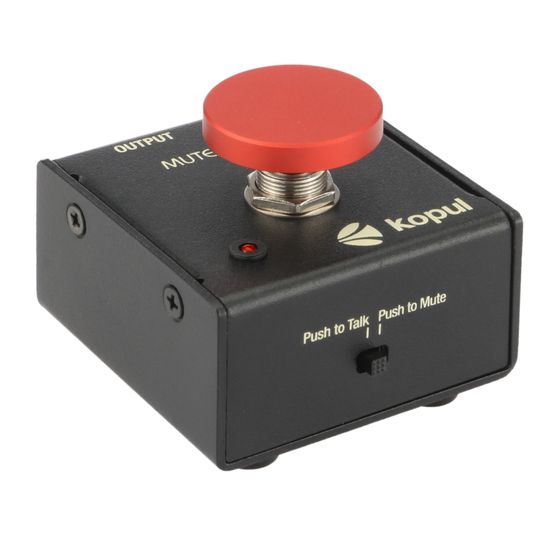
Kopul’s MUTEMATE-85 is a momentary mute/talk button that’s compatible with condenser and dynamic microphones. It functions as a temporary mute button that attenuates mic output by 85 dB, so under normal gain conditions, a broadcast audience, recording talent, and online conferees won’t hear coughs or side conversations. With the flip of a switch, it becomes a temporary talk button that activates the microphone while the button is pressed, which is great for talkback in studio applications. In both operating modes, an indicator LED illuminates when the MuteMate is active. The MuteMate features 3-pin XLR connectors for mic input and signal output to a recorder, sound system, or audio workstation. Nonslip rubber feet make the MuteMate a handy desktop accessory or foot switch. Mounting holes can be used for more permanent installation on podiums, walls, or workstations.
Features
Dynamic and Condenser Microphones
The MuteMate accepts signals from condenser and dynamic microphones. It automatically senses phantom power and passes it through for your condenser microphone. You can connect a dynamic microphone too, without changing settings. The MuteMate assures you of silent muting and unmuting no matter what kind of mic you use.
Compatible with Signal Boosters
The MuteMate adds a temporary mute or talk switch when you’re using the most popular brands of low-gain dynamic and ribbon microphones. When you add an inline signal booster, like the Cloudlifter mic activator or an inline mic preamplifier, like the Polsen Inline Single-Channel Mic Preamp, you can use the MuteMate in recording or broadcast applications.
Signal Attenuation
The MuteMate attenuates your microphone signal by 85 dB. When you use the MuteMate in normal sensitivity and gain conditions between 30 and 60 dB, your microphone will be entirely muted when the MuteMate is activated.
Press to Talk
When you’re recording talent or sitting in a noisy environment while you’re in an online conference, you can mute your microphone until you have something to say. In press-to-talk mode, they’ll hear you only when you want to say something. Otherwise, your mic will stay muted and prevent noise and conversation from distracting from your conference or recording session.
Press to Mute
When you’re leading a Zoom meeting or addressing a conference you probably want a live microphone all the time. But there will be moments when you need to mute the mic for a quick side conversation or to clear your throat. Press-to-mute mode momentarily mutes your microphone so you can cut out things you’d prefer to go unheard.
Status Indicator Light
The status indicator light is placed right next to the button so it’s easy to see, and you’ll know the mic’s status at all times.
Rugged Metal Housing
The MuteMate is made for repeated use and travel. The all-metal construction will stand up to bumps and dings whether it’s in a gear case or your pocket. Its rugged construction will also stand up to use as a foot switch.
Big Red Button
The mute/talk button is big and red, so it’s almost impossible to miss. For those times when you need to quickly swat at, or stomp on the button, you’ll be able to hit it so you can quickly add or subtract what you’re saying.
Mounting Options
The MuteMate comes with nonslip rubber feet, so it will stay put, even if on a polished desk or floor. The housing also has mounting holes for more permanent installation on a podium, studio, or workstation.
UPC: 847628550353